
./gophish
Executive Summary: The Metrics of Deception
Ad-hoc phishing scripts and rapid-deployment tools like SEToolkit are excellent for single targets or small-scale red team engagements. However, when a security organization is tasked with assessing the human vulnerability of a global enterprise with 5,000 employees, ad-hoc tools simply cannot scale. You need orchestration. You need granular metrics, scheduled dispatching, pixel-perfect tracking, and the ability to segment target audiences by department to deliver context-aware lures.
Gophish is an open-source, enterprise-grade phishing framework designed to make the execution of complex, large-scale campaigns trivial. It provides a RESTful API, a sleek Web UI, and the unparalleled ability to track exactly who opened the email, who clicked the link, and who submitted their credentials. This comprehensive guide will explore the architecture of Gophish, the critical infrastructure required to ensure high deliverability, the execution of sophisticated campaigns, and the defensive strategies required to protect the corporate inbox.
The Case for Enterprise Phishing Orchestration
In the early days of security awareness training, phishing simulations were often clumsy, misspelled, and blatantly obvious. Today, adversary emulation requires a higher standard of deception. Advanced Persistent Threats (APTs) and sophisticated ransomware operators do not send generic "Your mailbox is full" emails. They conduct extensive Open Source Intelligence (OSINT) gathering on LinkedIn, identify key personnel, and send highly targeted, perfectly formatted emails spoofing internal HR departments, third-party vendors, or executive leadership (Business Email Compromise).
To accurately simulate these threats and test the organization's incident response procedures, red teams need a framework that can replicate this level of sophistication. Gophish was built to solve this exact problem.
Gophish separates the infrastructure of sending emails from the logic of tracking the engagement. By abstracting the SMTP delivery process, an operator can seamlessly switch between different mailing servers, rotating IP addresses and domains on the fly to bypass increasingly aggressive spam filters. Furthermore, its ability to capture credentials securely and redirect users transparently makes it a dual-use tool: it is equally effective for benign security awareness training and aggressive red team credential harvesting operations.
Architecture and Infrastructure Setup
A successful Gophish campaign is entirely dependent on its underlying infrastructure. If an operator deploys Gophish on an IP address without proper DNS records or a poor sender reputation, the emails will be incinerated by perimeter security before they ever reach the target.
The Application Architecture
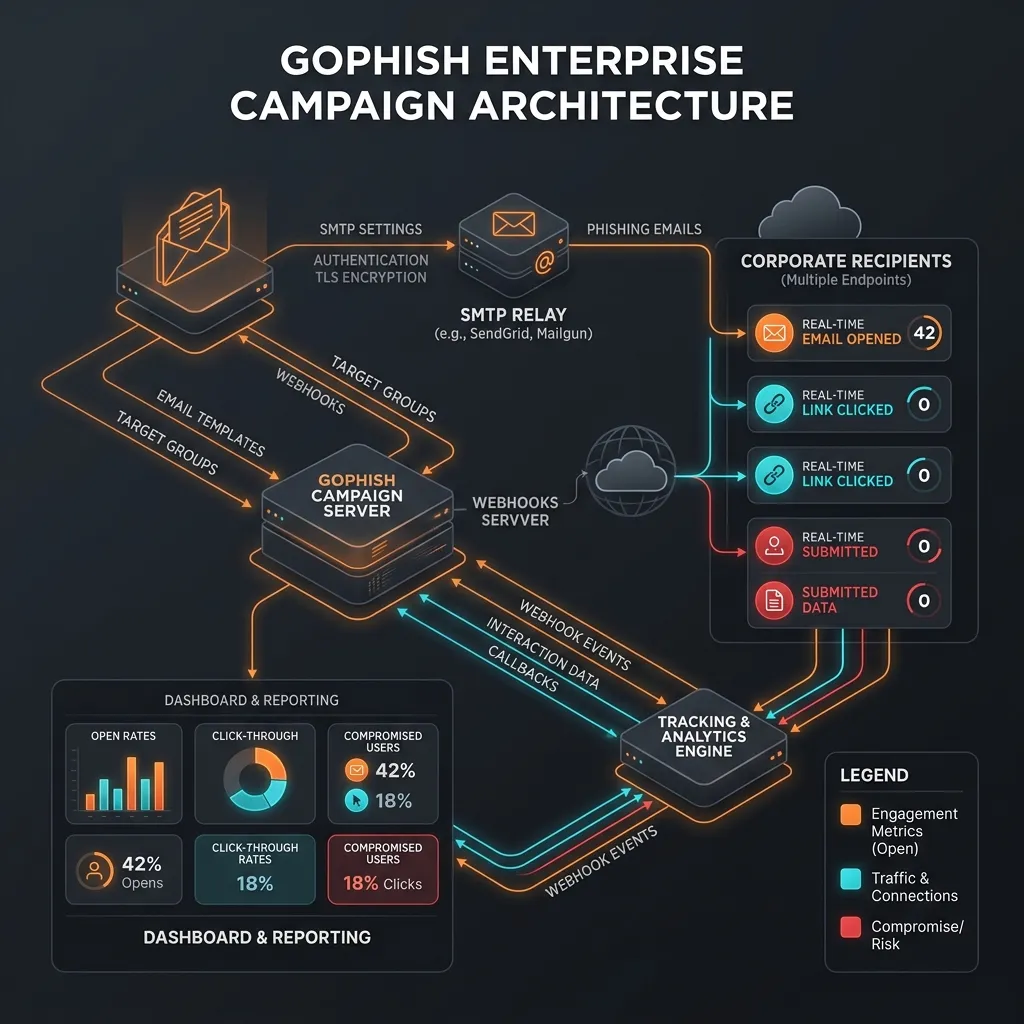
Gophish operates as a self-contained Go binary, running two distinct web services simultaneously:
- The Admin Server (typically port 3333): This is the Command and Control interface accessible only to the operator. It provides the UI for building campaigns, managing templates, and viewing analytics. It must be secured behind a firewall and accessed via a VPN or SSH tunnel.
- The Phishing Server (typically port 80/443): This is the public-facing trap. It serves the cloned landing pages, processes form submissions, and handles the requests generated by tracking pixels embedded in the emails.
Image Graph Description: Gophish Infrastructure and Tracking
Domain Security: SPF, DKIM, and DMARC
The most critical component of a Gophish campaign is establishing domain reputation. Modern Secure Email Gateways (SEGs) will not deliver an email unless it cryptographically proves it originated from an authorized sender.
1. The Spoofed Domain
Operators must register a deceptive domain that closely resembles the target organization or a trusted third party. For example, if the target is contoso.com, the attacker might register contoso-support.com or c0ntoso.com (using a zero).
2. SPF (Sender Policy Framework)
SPF is a DNS TXT record that lists all the IP addresses authorized to send email on behalf of a domain. The operator must configure the SPF record of their spoofed domain to include the IP address of their chosen SMTP relay.
v=spf1 include:sendgrid.net -all3. DKIM (DomainKeys Identified Mail)
DKIM provides a mechanism to cryptographically sign every email sent from the domain. The operator generates a public/private key pair. The public key is placed in a DNS TXT record, and the private key is configured within the SMTP relay (like Mailgun or SendGrid) to sign the outgoing headers.
4. DMARC
DMARC ties SPF and DKIM together. It instructs the receiving server on what action to take if an email fails the SPF or DKIM checks. Setting a DMARC policy of p=reject on the spoofed domain paradoxically increases deliverability, as it signals to the receiving server that the domain owner is serious about security.
Campaign Execution: The Four Pillars
Building a campaign in Gophish involves configuring four distinct components, which are then combined into a final deployment.
Pillar 1: The Sending Profile
This profile contains the SMTP credentials required to push the emails out to the internet.
- Host:
smtp.sendgrid.net:587 - Username / Password: The API credentials provided by the relay service.
- From Address: This is the deceptive address presented to the user. Gophish allows for arbitrary spoofing of the display name, e.g.,
"IT Service Desk" <support@contoso-support.com>.
Pillar 2: The Email Template
This is the lure. Gophish provides an intuitive HTML editor, but professional operators often import raw HTML downloaded directly from legitimate corporate communications to ensure pixel-perfect mimicking.
Gophish utilizes templating variables to dynamically generate unique content for every target in the list:
{{.FirstName}}: Personalizes the greeting, drastically increasing the click-rate.{{.URL}}: This is the most critical variable. When the campaign is launched, Gophish replaces this variable with a unique tracking link tied specifically to the individual user (e.g.,https://target-login.com/?rid=aB3x9Q). This uniquerid(Recipient ID) allows Gophish to track exactly who clicked the link.- The Tracking Pixel: By default, Gophish silently appends a 1x1 transparent image to the bottom of the HTML template. When the victim's email client downloads this image, it registers an "Email Opened" event in the dashboard.
Pillar 3: The Landing Page
This is the trap. The Landing Page is the HTML/CSS that is served when the victim clicks the {{.URL}} link in the email.
- Site Cloner: Gophish includes a built-in site cloner similar to SEToolkit. Provide a URL, and Gophish will download the assets.
- Capture Credentials: When this checkbox is enabled, Gophish will intercept any
POSTrequests made on the page and securely log the submitted data to its internal SQLite/MySQL database. - Capture Passwords: Gophish provides an option to discard passwords and only log usernames. This is crucial for benign security awareness training where logging plaintext passwords creates a massive liability.
- Redirect URL: After the victim submits the form, Gophish seamlessly redirects them to the legitimate site, leaving them completely unaware they have been compromised.
Pillar 4: Users & Groups
The final pillar is the target list. Operators import CSV files containing the target's First Name, Last Name, Email Address, and Position. Segmenting these lists is vital for highly targeted campaigns. A lure concerning "Q3 Financial Reports" should only be sent to the Finance department group, while a lure regarding "Docker Image Vulnerabilities" should target the DevOps group.
Advanced Tactics: Evading Detection
As defenses mature, Gophish operators must employ advanced tactics to ensure their payloads reach the inbox and their landing pages remain undetected by automated web scanners.
Evasive Landing Pages
Security vendors like Microsoft Defender and Palo Alto Networks employ automated bots that scan incoming emails, click the links, and analyze the resulting web pages for malicious intent. If these bots detect a cloned Microsoft 365 login page, they will immediately block the domain.
To evade these bots, operators use Conditional Redirection or Cloaking. Before serving the actual cloned page, the server checks the User-Agent, IP address, and behavior of the incoming request.
- If the request originates from an AWS data center (likely a security bot), the server responds with a benign page (e.g., a generic "Under Construction" page) or a 404 error.
- If the request originates from a standard residential ISP or a known corporate IP block, the server serves the malicious phishing page.
Time-Delayed Dispatching
Sending 5,000 emails simultaneously from a newly registered domain will immediately trigger rate-limiting and spam heuristics on the receiving mail server. Gophish allows operators to schedule the campaign and trickle the emails out slowly over a period of days or weeks, mimicking standard human email patterns.
Analytics, Metrics, and Reporting
The true power of Gophish lies in its analytics dashboard. Once a campaign is launched, the operator has a real-time, granular view of the attack progression across the entire enterprise.
The dashboard tracks the conversion funnel:
- Email Sent: The SMTP relay successfully delivered the message.
- Email Opened: The target loaded the tracking pixel, indicating they are actively viewing the lure.
- Clicked Link: The target engaged with the email and navigated to the Landing Page.
- Submitted Data: The ultimate compromise; the target entered their credentials into the trap.
- Reported Email: Advanced configurations allow Gophish to integrate with internal "Report Phishing" buttons. If a user spots the phish and reports it, Gophish logs this as a positive security event.
These metrics allow security teams to generate comprehensive executive reports. By analyzing the data, organizations can identify which departments are most susceptible, which types of lures are most effective, and tailor their subsequent security awareness training programs to patch the specific human vulnerabilities identified during the campaign.
Blue Team Strategies: Defending the Inbox
Defending against an expertly crafted Gophish campaign requires a defense-in-depth approach, as no single technology can catch every phish.
1. Robust Email Gateway Configuration
The Secure Email Gateway (SEG) must be configured to ruthlessly enforce SPF, DKIM, and DMARC. Any email failing these checks should be quarantined. Additionally, the SEG should utilize advanced link analysis (Time-of-Click protection) to evaluate URLs at the exact moment the user clicks them, rather than just when the email is received.
2. Disabling External Image Loading
The mechanism Gophish uses to track "Email Opened" events relies on the email client automatically downloading external images (the 1x1 tracking pixel). Organizations should enforce Group Policies that prevent email clients (like Outlook) from downloading external images by default, severely degrading the attacker's visibility into the campaign's success.
3. Phishing-Resistant Authentication (FIDO2)
As emphasized throughout the Social Engineering Hub, the only foolproof defense against credential harvesting is the deployment of FIDO2 / WebAuthn hardware security keys. Even if the Gophish campaign is flawlessly executed and the victim submits their credentials to the perfectly cloned landing page, the stolen password cannot be used to bypass the hardware-backed, origin-bound authentication challenge.
4. Creating a Security Culture
Technology alone cannot solve a human problem. Organizations must foster a "no-blame" security culture where employees feel comfortable reporting suspicious emails. A workforce that actively reports phishing attempts is the most effective intrusion detection system an organization can deploy.