
10 Critical Behavioral & Digital Signs of a Hacked Device
Mobile malware operates differently than traditional desktop viruses. Professional threat actors design their payloads to remain stealthy, often aiming to exfiltrate data over extended periods rather than causing immediate, destructive chaos. However, because malware must consume system resources and alter device configurations to function, it inevitably leaves distinct digital footprints.
Here are the 10 primary technical and behavioral indicators that your smartphone has been compromised by a malicious actor:
Unexplained Data Usage Spikes
Malware, spyware, and stalkerware must transmit your stolen data, such as high-resolution photos, ambient audio recordings, call logs, and real-time GPS coordinates, back to an external Command-and-Control (C2) server. If you review your cellular or Wi-Fi data usage and notice a sudden, massive spike that does not correlate with your actual browsing, streaming, or downloading habits, hidden background processes are likely broadcasting your data externally.
Rapid Battery Depletion and Thermal Load
While lithium-ion battery health naturally degrades over years of use, a sudden and precipitous drop in battery life is a severe red flag. If a full charge suddenly lasts only a few hours, or if your device is running physically hot to the touch while sitting idle on a desk, the processor is under heavy load. Malicious processes like continuous location tracking, live microphone audio streaming, or hidden cryptojacking scripts require immense processing power, causing rapid battery drain and high thermal output.
Mysterious Applications on Your Device
The sudden appearance of applications you do not remember authorizing or downloading is a critical indicator of compromise. This frequently occurs via 'drive-by downloads' from compromised websites, or when a seemingly benign application (like a flashlight or calculator app) downloads a secondary, hidden malicious payload in the background after bypassing initial security scans.
Severe Performance Degradation and Frequent Crashes
Is your modern, flagship smartphone suddenly freezing, crashing native applications, or lagging heavily when typing a simple text message? When sophisticated malware monopolizes your phone’s Central Processing Unit (CPU) and Random Access Memory (RAM), legitimate system applications are starved of essential resources, leading to severe, uncharacteristic performance degradation.
Unauthorized Account Activity and MFA Alerts
If your mobile device is compromised, the accounts connected to it are inherently compromised as well. Receiving unexpected Multi-Factor Authentication (MFA) codes, password reset notifications, or alerts regarding unrecognized logins to your banking, social media, or corporate email accounts strongly suggests a hacker is actively exploiting credentials harvested directly from your device.
Strange Pop-ups and Adware Infestations
Persistent, aggressive pop-ups appearing on your home screen, overlaying secure applications, or flooding your notification shade indicate adware or a compromise at the root level of your operating system. Cybercriminals use these pop-ups to generate fraudulent ad revenue or trick you into downloading further, more destructive malware.
Outbound Calls or Texts You Didn't Initiate
Premium-rate SMS scams remain a highly lucrative avenue for hackers. This involves malware silently sending hidden text messages or initiating brief calls to high-cost premium numbers owned by the scammers themselves. You must routinely check your itemized phone bill for outgoing calls or texts to international or unknown numbers that you did not make.
Camera or Microphone Indicators Lighting Up Extraneously
Modern iOS and Android operating systems have implemented privacy features that display a small colored dot (usually green or orange) in the top corner of the screen whenever the microphone or camera hardware is active. If this privacy indicator illuminates when you are not actively using an application that requires camera or microphone access, a background process, likely a Remote Access Trojan (RAT) is actively spying on you.
Strange Communications Received by Your Contacts
If friends, family members, or professional contacts inform you that they are receiving strange links, spam messages, or highly targeted phishing lures originating from your phone number, social media profiles, or email address, your device is likely acting as a compromised botnet node designed to propagate malware to your network.
Device Boot Anomalies and Refusal to Shut Down
Advanced malware often attempts to prevent the device from shutting down or rebooting to maintain its persistence in the system memory and preserve its active connection to the C2 server. If your phone takes an unusually long time to turn off, cancels the shutdown sequence entirely, or restarts randomly on its own, its core system files may have been deeply manipulated.
Telecom Interrogation Protocol
Many device owners are entirely unaware that telecommunications networks feature built-in diagnostic codes. These are known as USSD (Unstructured Supplementary Service Data) codes or MMI codes. These protocols allow you to bypass the operating system and interface directly with your mobile carrier's infrastructure to determine if your data, calls, or SMS messages are being intercepted, mirrored, or forwarded to an unauthorized third party.
What to dial to see if your phone is hacked
To deploy these diagnostic checks, open your phone's default phone/dialer application, type the sequence exactly as written below, and press the Call button.
This is the most comprehensive initial code to check if your calls, messages, data packets, fax, or SMS are being forwarded without your consent. When executed, a grey status screen will appear. You are looking for any service that reads "Forwarded" instead of "Not Forwarded."
This code reveals the specific routing path of your data when your phone is unreachable, busy, or turned off. Under normal circumstances, this should display your cellular carrier's official voicemail routing number. If it displays an unfamiliar or international number, your incoming calls are actively being intercepted when your device is offline.
If either of the above codes reveals unauthorized forwarding to an unknown number, dialing ##002# acts as a universal kill switch. It interfaces with the carrier network to instantly wipe all conditional and unconditional call and data forwarding configurations, severing the attacker's interception line.
Platform Specifics: Android Routing & Free Diagnostics
What to dial to see if your phone is hacked Android
If you are operating an Android device, cybercriminals frequently utilize malicious conditional forwarding to hijack SMS verification codes (OTPs) for banking fraud. To combat this specific threat vector, Android users must utilize specific diagnostic tools via the dialer interface to map out the exact routing of unanswered calls.
Beyond the universal codes mentioned above, you must deploy the tracking code:
- *#61#: This code specifically checks for unanswered call forwarding protocols. Scammers often configure mobile malware to wait for your phone to ring a few times before silently routing the call to their own systems to intercept voicemail or automated voice verification codes. Executing this code will show you the exact destination number and the delay time (in seconds) before the call shifts over to the interceptor.
If any number appears that is not your official network operator's designated voicemail center, document the number immediately (this is your attacker's point of interception) and then use the global erase command ##002# to break the connection.
What to dial to see if your phone is hacked Android free
You do not need to purchase expensive software or premium utility subscriptions simply to check the underlying telecom routing of your Android phone. The USSD commands are hardcoded protocols handled directly by your SIM card and your network provider.
By utilizing these internal commands, you can instantly audit your cellular layer without paying a dime to external security applications that often harvest your data themselves.
What to dial to see if your phone is hacked Samsung
Samsung devices operate on an Android baseline but include proprietary software layers (such as One UI) and a distinct hardware security architecture (Samsung Knox). To inspect a Samsung device for deep-level modifications or to check if your traffic has been redirected, you can deploy exclusive Samsung hardware test menus alongside standard USSD codes.
- Network Redirection Verification: Dial *#21# inside the Samsung Phone app. Pay explicit attention to the "Sync" and "Data" parameters on the return screen. If sophisticated spyware has established an alternate packet gateway (APN), it may show up here as an active data forward.
- Accessing the Hidden Hardware Diagnostic Menu: On unlocked Samsung devices, you can dial *#0*#. This opens a raw hardware utility interface originally designed for factory engineers. While it won't explicitly flash a "You are hacked" warning, it allows you to individually test your device sensors, camera control, and sub-components. If certain modules (like your front camera or microphone) fail to load or report that they are "currently in use by another application," this is physical confirmation that a hidden application is holding an active handle on your hardware.
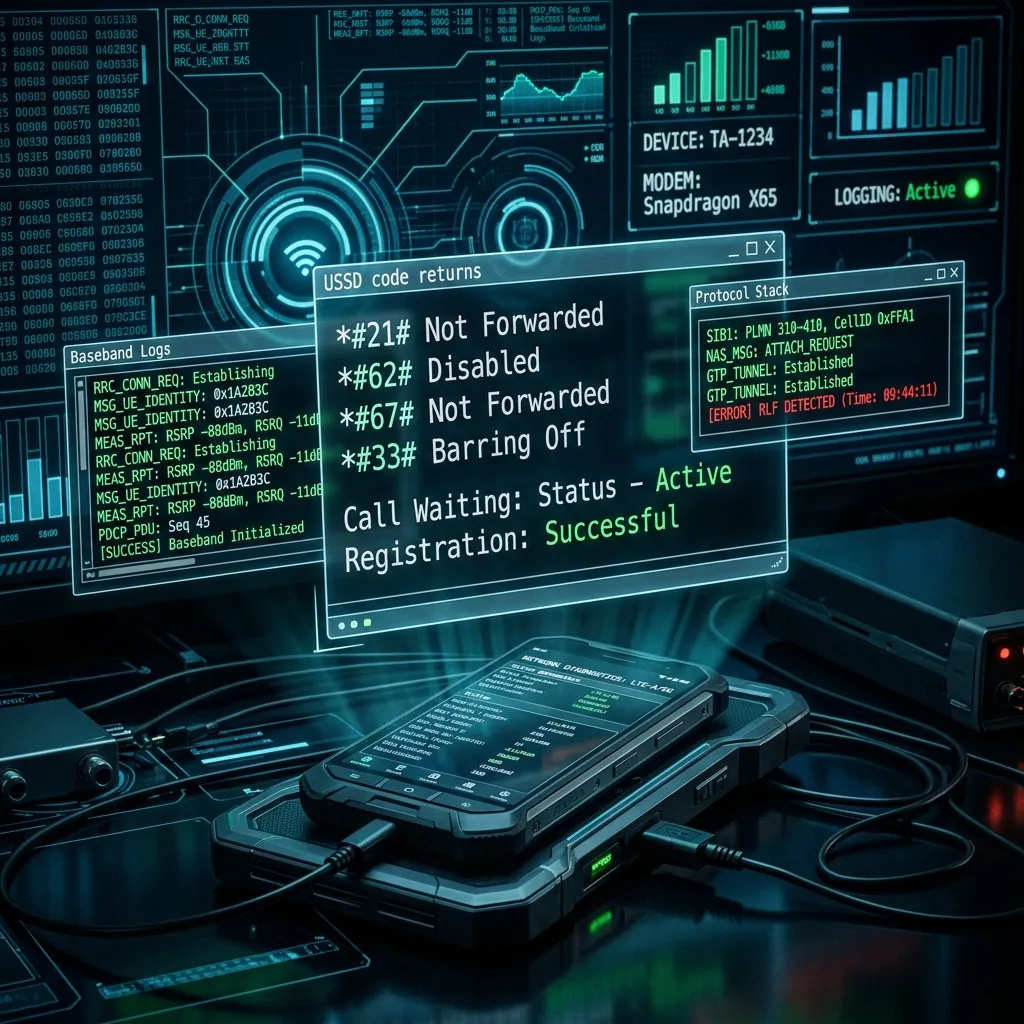
fig.1 — Forensic extraction audit: intercepting deep system modifications and backdoors
System Configuration Auditing
How to check if your phone is hacked in settings
Not all compromises occur at the network routing layer. The vast majority of modern mobile threats exist as malicious applications running locally on the device with elevated system permissions. You can hunt down these threats manually by thoroughly auditing your device configurations.
- Review Device Admin Apps:
Navigate toSettings > Security & Privacy > Other Security Settings > Device Admin Apps. Malicious apps aggressively seek "Device Administrator" status to prevent you from easily uninstalling them. Only highly trusted applications like "Find My Device" should be enabled. Disable everything else. - Examine Unknown App Sources:
Navigate toSettings > Apps > Special App Access > Install Unknown Apps. Ensure that web browsers, file managers, and messaging apps do not have permission to silently install third-party packages onto your system. - Audit Accessibility Services:
Go toSettings > Accessibility > Installed Apps(or Downloaded Services). Spyware heavily exploits Android's Accessibility APIs, designed for disabled users, to read screen contents, capture keystrokes, and bypass security boundaries. Disable any unrecognized service and delete the parent app.
- Inspect Configuration Profiles:
Navigate toSettings > General > VPN & Device Management. If you see a Mobile Device Management (MDM) configuration profile listed here that you did not explicitly install (and is not mandated by your employer), delete it immediately. These profiles can intercept all web traffic and force app installations. - Audit App Permissions:
Go toSettings > Privacy & Security. Systematically tap on Microphone, Camera, and Location Services. If a simple utility app has active access to your location or microphone, revoke that privilege instantly.
Remediation Protocol: Restoring Device Integrity
Phone hacked what to do Android
If your Android phone exhibits confirmed signs of a security breach, you must act decisively to isolate the threat before the attacker can drain your financial accounts, steal your identity, or lock you out of your digital life. Follow this strict containment strategy:
Immediately disconnect your phone from the internet. Swipe down the notification panel and enable Airplane Mode, then ensure Wi-Fi is toggled off. This severs the vital link between the malware on your device and the hacker's external C2 server, halting data exfiltration and preventing the attacker from sending remote wipe commands.
Safe Mode forces the Android operating system to boot using only native, factory-installed applications. This temporarily disables all third-party malicious processes, allowing you to delete persistent threats without the malware fighting back. • Hold down the physical power button until the power menu appears. • Tap and hold the on-screen Power Off or Restart icon until the 'Reboot to Safe Mode' prompt appears. • Tap OK to confirm. Your device will restart with a 'Safe Mode' watermark.
While secured in Safe Mode, navigate to Settings > Apps > All Apps. Scan the list for any application you don't recognize, apps without an icon, or apps installed around the exact date your device started exhibiting anomalies. Tap the suspicious app, select Force Stop, then Clear Cache, Clear Data, and finally tap Uninstall.
My phone was hacked how do I fix it for free
You do not need to spend thousands of dollars on consumer cyber forensics experts or premium cleanup software subscriptions to remediate a hacked mobile device. You can restore your device to a verified, secure baseline completely for free using built-in operating system recovery procedures.
[ Execution Pathways ]
Navigate to Settings > System > Reset Options (or General Management > Reset). Tap Erase all data (factory reset). Enter your PIN to authorize the action, and confirm by selecting Erase Everything.
Navigate to Settings > General > Transfer or Reset iPhone. Select Erase All Content and Settings. Enter your passcode to bypass the activation lock and format the device storage.

fig.2 — Restoration complete: establishing a secure, verified baseline partition free of malware
Frequently Asked Questions
Submit a Case for Device Forensics
If you require professional assistance verifying a breach, extracting evidence for legal proceedings, or securing compromised digital assets, our team at MobileHackerForHire is standing by.
Start A Confidential Investigation