
frida -U -f com.mhfh.webviewlab -l trace-webview-bridges.js
Executive Summary: When Web Content Gains Native Reach
An Android WebView JavaScript interface exploit crosses a boundary that ordinary browser JavaScript cannot cross. A WebView renders HTML inside an Android application, while addJavascriptInterface exposes selected Java or Kotlin methods as a JavaScript object. If untrusted script reaches that object, the script can invoke native functionality with the identity and permissions of the host application.
The bridge itself is not automatically a vulnerability. Exploitability requires a complete path: JavaScript must execute, the bridge must be present in the relevant frame, an exposed method must perform a meaningful operation, and the application must fail to constrain the content or parameters reaching that method. This tutorial builds and tests that path in a controlled Android lab.
You will decompile a sample APK, identify its WebView configuration, trace bridge registration with Frida, call a benign lab method from JavaScript, test iframe reachability, and turn the observations into a precise finding. The focus is repeatability: every conclusion should map to source evidence, runtime evidence, or a visible result inside the test package.
The WebView Trust Boundary
Android's WebView is an embeddable browser component. It has a rendering engine, JavaScript runtime, cookies, navigation history, storage, and network behavior, but it runs inside an application process. That placement lets developers combine web interfaces with native capabilities such as preferences, notifications, file selection, or authenticated API calls.
The bridge is created when native code supplies an object and a JavaScript name:
webView.settings.javaScriptEnabled = true
webView.addJavascriptInterface(SupportBridge(this), "NativeSupport")
webView.loadUrl("https://support.example.test/mobile")
JavaScript loaded in the WebView can then call methods annotated with @JavascriptInterface:
class SupportBridge(private val context: Context) {
    @JavascriptInterface
    fun appVersion(): String {
        return BuildConfig.VERSION_NAME
    }

    @JavascriptInterface
    fun setTheme(theme: String) {
        context.getSharedPreferences("ui", Context.MODE_PRIVATE)
            .edit()
            .putString("theme", theme)
            .apply()
    }
}
Inside the document, window.NativeSupport.appVersion() returns a value from native code. The page did not obtain general Java reflection or arbitrary code execution; it received the exact callable methods exposed by the bridge. The security question is whether every script capable of reaching that object deserves those methods.

The native bridge connects a web execution context to application capabilities. Intended content and hostile child frames converge on the same interface unless the surrounding design prevents untrusted JavaScript from entering the WebView.
Android's official WebView native bridge guidance highlights the central limitation: an object registered through addJavascriptInterface is injected into every frame, while the application has no built-in mechanism to verify the origin of the calling frame. The trust decision therefore happens before the method call—through content selection, navigation control, input handling, and bridge design.
Conditions Required for Exploitation
A useful assessment separates bridge inventory from reachable impact. The following conditions form the exploit chain:
| Condition | Question | Evidence |
|---|---|---|
| JavaScript execution | Is JavaScript enabled in this WebView? | setJavaScriptEnabled(true) or runtime state |
| Interface registration | Which object name and class are injected? | addJavascriptInterface call or Frida trace |
| Untrusted content path | Can attacker-influenced script enter any frame? | URL input, XSS, iframe, redirect, local file |
| Native capability | What does each annotated method do? | Decompiled method and controlled invocation |
| Missing validation | Does the method enforce authorization and strict input rules? | Source review and boundary tests |
Removing any one link can break the chain. For example, a bridge that returns the application version may be reachable from an untrusted iframe but have negligible impact. A bridge that initiates an authenticated export may be powerful, but it is not reachable if the WebView loads only immutable packaged content with no script injection path.
Do not write “JavaScript is enabled” as the finding. Android disables WebView JavaScript by default, but enabling it is common and not independently proof of a flaw. The finding is the complete path from attacker-controlled script to a native method and measurable consequence.
Build a Controlled WebView Bridge Lab
Use an emulator snapshot and a purpose-built application such as the OWASP MASTG demo for native code exposed through WebViews or an internal test package. The examples below use com.mhfh.webviewlab, a fictional lab package with no production data.
The lab activity contains a WebView and a deliberately weak bridge:
class LabBridge(private val context: Context) {
    @JavascriptInterface
    fun getProfileLabel(): String {
        return context.getSharedPreferences("lab", Context.MODE_PRIVATE)
            .getString("profile_label", "training-user") ?: "training-user"
    }

    @JavascriptInterface
    fun writeAuditMarker(value: String): Boolean {
        if (value.length > 40) return false
        context.getSharedPreferences("lab", Context.MODE_PRIVATE)
            .edit()
            .putString("audit_marker", value)
            .apply()
        return true
    }
}

webView.settings.apply {
    javaScriptEnabled = true
    allowFileAccess = false
    allowContentAccess = false
}
webView.addJavascriptInterface(LabBridge(this), "LabBridge")
webView.loadUrl("https://app.example.test/lab")
The marker method creates a visible, reversible result without exposing credentials or device data. It allows the lab to prove that JavaScript crossed into native code. Reset application storage or revert the emulator snapshot after the exercise.
Record the baseline before testing:
adb shell pm clear com.mhfh.webviewlab
adb shell monkey -p com.mhfh.webviewlab 1
adb logcat -c
adb shell dumpsys package com.mhfh.webviewlab | grep -E "versionName|targetSdk"
Capture the APK hash, target SDK, Android version, WebView provider version, test URL, and application version. WebView behavior evolves independently through the Android System WebView package, so recording only the operating-system version is incomplete.
Static Discovery: Map Every WebView and Bridge
Begin with the APK rather than the visible screen. An application may create WebViews in support flows, advertisements, authentication activities, help centers, rich-message viewers, or SDK code that is not reached during a quick manual tour.
Decode resources and decompile bytecode:
sha256sum webview-lab.apk
apktool d webview-lab.apk -o webview-lab-decoded
jadx -d webview-lab-jadx webview-lab.apk

grep -RniE "addJavascriptInterface|JavascriptInterface|setJavaScriptEnabled|postWebMessage|WebMessagePort|loadUrl|loadDataWithBaseURL" \
  webview-lab-decoded webview-lab-jadx
For every registration, build a small inventory:
- Activity, fragment, service, or SDK that owns the WebView.
- JavaScript object name exposed to the page.
- Concrete class of the injected object.
- Every public method annotated with
@JavascriptInterface. - Data read, actions performed, and permissions used by those methods.
- URL sources the WebView can load.
- Redirect, popup, and iframe behavior.
- File, content, and universal file URL settings.
- Minimum and target SDK values.
The @JavascriptInterface annotation became the method exposure boundary for applications targeting API level 17 and later. Android's JavascriptInterface API reference confirms that only annotated public methods are exposed for those targets. Older target behavior was broader, which is why target SDK belongs in the evidence table.
Static analysis can miss reflection, generated bindings, dynamically loaded code, and third-party SDK behavior. It provides candidates for runtime validation, not a guarantee of execution.
Trace Bridge Registration with Frida
Hooking WebView.addJavascriptInterface reveals the object name, native class, and registration stack while the application runs. This is especially valuable when the bridge originates in an obfuscated SDK.
Save the following as trace-webview-bridges.js:
Java.perform(function () {
  const WebView = Java.use("android.webkit.WebView");
  const Exception = Java.use("java.lang.Exception");
  const Log = Java.use("android.util.Log");

  const addInterface = WebView.addJavascriptInterface.overload(
    "java.lang.Object",
    "java.lang.String"
  );

  addInterface.implementation = function (object, name) {
    const className = object.getClass().getName();
    console.log("[+] JavaScript interface registered");
    console.log("    name:  " + name);
    console.log("    class: " + className);
    console.log(Log.getStackTraceString(Exception.$new()));
    return addInterface.call(this, object, name);
  };

  console.log("[+] WebView bridge registration tracer installed");
});
Spawn the lab application so the hook is present before its activity configures the WebView:
frida -U -f com.mhfh.webviewlab -l trace-webview-bridges.jsExpected evidence resembles:
[+] JavaScript interface registered
    name:  LabBridge
    class: com.mhfh.webviewlab.LabBridge
    at com.mhfh.webviewlab.WebActivity.configureWebView(WebActivity.kt:48)
If nothing appears, verify that the process resumed, the expected activity opened, and networking or feature flags did not prevent initialization. The application may also create the WebView in another process. Compare adb shell ps -A with manifest android:process declarations.
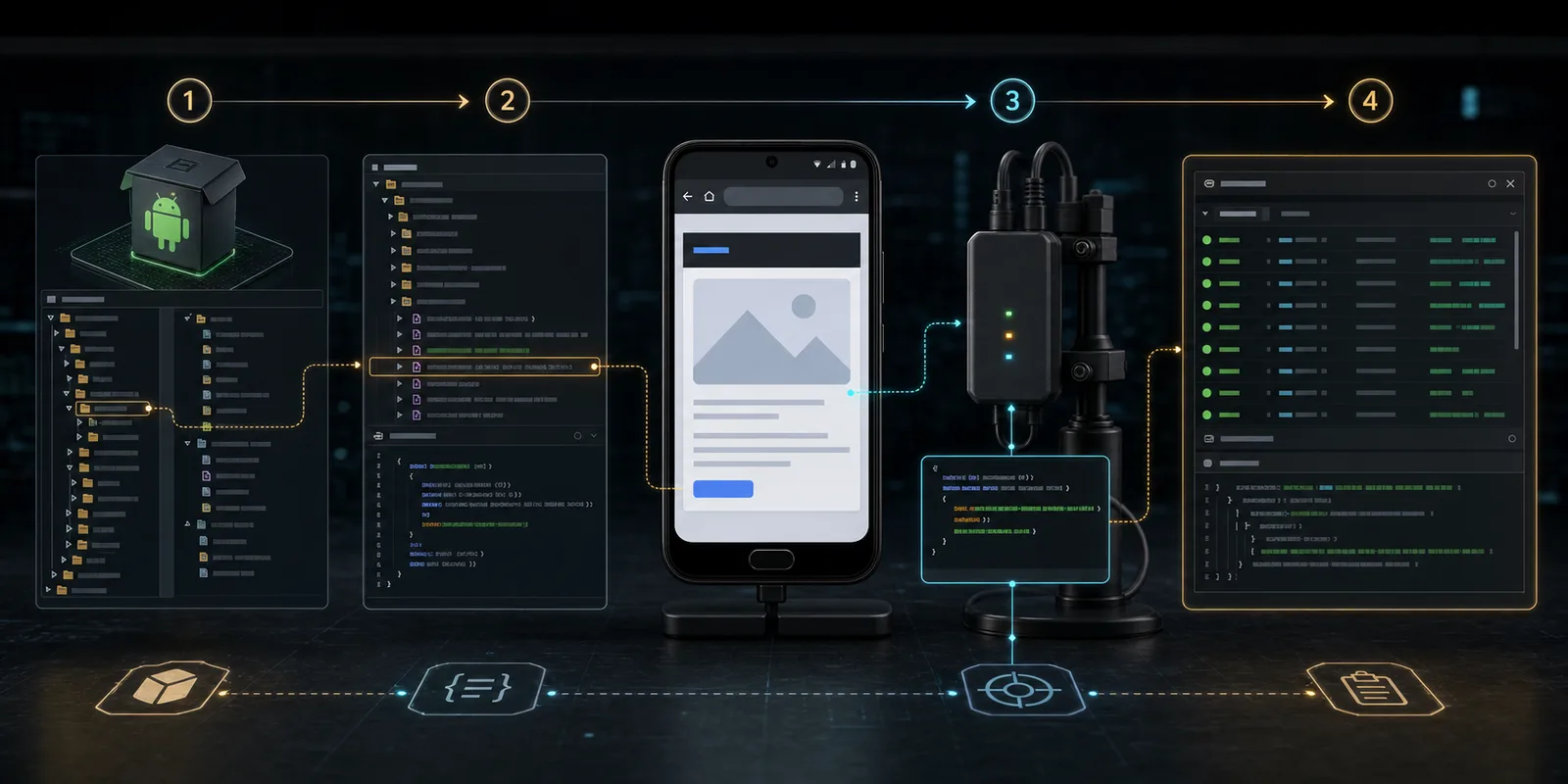
A reliable test moves from APK inventory to runtime registration, controlled JavaScript invocation, and preserved evidence. Each stage narrows the finding instead of assuming every WebView shares the same configuration.
Trace the Exposed Native Method
Once registration proves the bridge class, hook its annotated methods without changing their behavior. The trace confirms that a JavaScript action reached the expected native function.
Java.perform(function () {
  const LabBridge = Java.use("com.mhfh.webviewlab.LabBridge");
  const writeAuditMarker = LabBridge.writeAuditMarker.overload("java.lang.String");

  writeAuditMarker.implementation = function (value) {
    console.log("[+] LabBridge.writeAuditMarker called");
    console.log("    value: " + value);
    const result = writeAuditMarker.call(this, value);
    console.log("    result: " + result);
    return result;
  };
});
This hook observes the call and invokes the original method. It does not manufacture success. That distinction keeps the test evidence useful: the JavaScript payload, method trace, return value, and stored marker all describe the application's real behavior.
Invoke the Bridge from a Lab Page
In the controlled top-level lab document, use a small test function:
<!doctype html>
<html lang="en">
  <head><meta charset="utf-8"><title>Bridge Lab</title></head>
  <body>
    <button id="verify">Verify native bridge</button>
    <pre id="result"></pre>
    <script>
      document.getElementById("verify").addEventListener("click", function () {
        const label = window.LabBridge.getProfileLabel();
        const changed = window.LabBridge.writeAuditMarker("webview-lab-confirmed");
        document.getElementById("result").textContent =
          JSON.stringify({ label: label, markerWritten: changed }, null, 2);
      });
    </script>
  </body>
</html>
The expected result is deliberately limited: the page reads a non-sensitive training label and writes a reversible marker. Confirm it from the native side:
adb shell run-as com.mhfh.webviewlab \
  cat shared_prefs/lab.xml
The evidence chain now contains four independent observations:
- Decompiled code shows the annotated method.
- Frida shows the bridge registration and native class.
- Frida shows the method call and supplied marker.
- Application storage contains the expected lab value.
Test Cross-Frame Reachability
The highest-value bridge property is easy to overlook: addJavascriptInterface injects the object into all frames, including child iframes. The bridge method itself does not receive a trustworthy origin value telling it which frame initiated the call.
Create a second lab page served from a distinct local test origin and load it as an iframe inside the approved top-level page. Its script should call only the benign marker method:
<script>
  const reached = window.LabBridge.writeAuditMarker("iframe-reached-bridge");
  document.body.textContent = "bridge result: " + reached;
</script>
If the marker changes and Frida logs the method, the child frame reached the same native object. That result is not yet a production exploit; it demonstrates that origin separation expected by web developers does not automatically protect a legacy native bridge.
Next, determine whether an untrusted frame can enter the real application. Review Content Security Policy, frame restrictions, HTML injection points, advertising content, rich-text messages, redirect behavior, and any page that incorporates third-party scripts. The finding becomes stronger only when the frame reachability is tied to an actual content path.
Unsafe URL Loading Creates the Entry Point
Many WebView bridge findings begin outside the WebView. An exported activity accepts a URL from an intent, a deep link controls a query parameter, or a redirect moves navigation from an allowlisted host to an untrusted destination.
A weak check often looks like this:
if (url.contains("example.test")) {
    webView.loadUrl(url)
}
Substring checks are not origin validation. A value such as https://example.test.attacker.invalid/ contains the expected text but has a different host. User-info syntax, encoded characters, mixed schemes, redirects, and parser disagreement create additional edge cases.
Parse the URL once and compare normalized components:
fun isAllowedWebViewUrl(raw: String): Boolean {
    val uri = Uri.parse(raw)
    return uri.scheme == "https" &&
        uri.host == "app.example.test" &&
        uri.port == -1 &&
        uri.userInfo == null
}
Then enforce the same policy on initial loads, redirects, popup requests, and navigation initiated from JavaScript. Android's unsafe URI loading guidance specifically calls out checking both scheme and host instead of treating a URL as an unstructured string.
File Access Can Expand the WebView Attack Surface
Legacy applications sometimes load packaged pages through file:// and enable broad file URL permissions. The combination of JavaScript, untrusted local content, and setAllowUniversalAccessFromFileURLs(true) can create a bridge between local files, network origins, and native methods.
During static and dynamic inspection, record:
setAllowFileAccess
setAllowContentAccess
setAllowFileAccessFromFileURLs
setAllowUniversalAccessFromFileURLs
loadUrl("file://...")
loadDataWithBaseURL
The deprecated universal and cross-file settings should not be normalized as ordinary configuration. Android recommends WebViewAssetLoader for packaged content because it maps local resources onto an HTTPS-style origin and avoids several file:// hazards. The official unsafe file inclusion guidance documents the relevant settings and safer loading model.
Message Channels Are Different, Not Automatically Safe
Modern applications may use WebMessagePort, postWebMessage, or AndroidX WebKit message listeners instead of addJavascriptInterface. This changes the mechanism but preserves the core trust question: which origins can send messages, and what native actions can those messages request?
Review target origins and listener rules. A wildcard target origin effectively says any loaded origin may receive the message. A listener that accepts * or fails to verify the source origin may turn structured messaging into another untrusted entry point.
Prefer origin-scoped messaging when a bridge is necessary. Define an explicit message schema, reject unknown fields, cap lengths, and expose narrow operations rather than a generic command dispatcher. A message such as { "action": "openSettings" } is easier to reason about than { "method": "invoke", "class": "...", "args": [...] }.
Common Testing Mistakes
Treating every bridge as remote code execution
On current Android targets, JavaScript ordinarily reaches annotated methods, not arbitrary public Java reflection. Report what the exposed method actually enables. Do not inherit the impact language of pre-API-17 behavior without confirming the target and runtime.
Testing only the visible top-level URL
Subframes, redirects, popup windows, injected HTML, and SDK-managed pages may share the same WebView. Inventory navigation paths and frame behavior rather than assuming the address initially passed to loadUrl remains the only content.
Ignoring application state
A method may behave differently before login, after login, or after a feature flag registers an additional bridge. Repeat registration traces across material states and record when each object becomes available.
Using evaluateJavascript as proof of a real entry path
An analyst can always inject script into a debuggable lab WebView. That proves the bridge is callable, but not that outside input can introduce JavaScript. Separate capability validation from entry-point validation in the report.
Missing third-party SDK bridges
SDK classes may be obfuscated and instantiated dynamically. Runtime registration tracing finds the concrete class and stack even when string searches do not reveal a recognizable interface name.
Evidence and Severity Model
Preserve enough context for another analyst to reproduce the finding:
- APK SHA-256 and application version.
- Android, target SDK, and WebView provider versions.
- Owning activity and process.
- Bridge object name and concrete class.
- Annotated methods with signatures and native effects.
- Every reachable content source and frame type.
- Frida registration and invocation logs.
- Minimal lab HTML used to call the bridge.
- Reversible result, such as the audit marker.
- Conditions that prevent or enable the chain.
Severity should follow capability and reachability. A version-returning method exposed only to fixed packaged content is informational at most. A state-changing method reachable through externally supplied navigation is materially different. A method that returns an authenticated token to any iframe represents a direct confidentiality failure. Keep these cases separate instead of assigning one severity to the API name.
Secure Redesign Checklist
A strong remediation reduces both sides of the equation: less untrusted content and less native authority.
- Disable JavaScript for WebViews that render static content.
- Avoid legacy bridges when origin-scoped messaging can satisfy the requirement.
- Load only explicit HTTPS scheme-and-host combinations.
- Apply the URL policy to redirects, popups, and child navigation.
- Remove the interface before any untrusted content is loaded.
- Do not expose credentials, tokens, raw files, or generic command dispatch.
- Validate every argument again inside the native method.
- Require native application state or user confirmation for consequential actions.
- Disable broad file and content access.
- Use
WebViewAssetLoaderfor packaged web resources. - Restrict message channels to exact trusted origins.
- Test bridge behavior with hostile iframes and redirects in CI.
OWASP's current native code exposed through WebViews test evaluates precisely this boundary: whether a legacy WebView-native bridge exposes sensitive code or functionality to websites rendered inside the component.
Frequently Asked Questions
What is an Android WebView JavaScript interface?
It is a Java or Kotlin object registered with WebView.addJavascriptInterface. After JavaScript is enabled and the page reloads, annotated public methods appear under the supplied object name in every WebView frame. This lets web code request narrowly defined native Android functions.
When is a WebView JavaScript bridge exploitable?
The bridge is exploitable when untrusted JavaScript can reach it and at least one exposed method creates useful impact. The entry path may be unsafe URL loading, cross-site scripting, an untrusted iframe, a redirect, compromised third-party content, or unsafe local file loading.
Can every iframe call the injected object?
Yes, legacy addJavascriptInterface objects are injected into all frames. The called native method does not receive a dependable frame origin from the bridge API. The application must therefore control which content and frames load or use a different origin-aware communication design.
How does Frida help test Android WebView bridges?
Frida can hook addJavascriptInterface to record the JavaScript name, object class, and registration stack. It can then trace selected annotated methods to prove a lab page reached native code. Frida supplies runtime evidence but does not replace analysis of the real JavaScript entry path.
Conclusion: Prove the Entire Bridge Chain
An Android WebView JavaScript interface exploit is not established by one grep result or one JavaScript-enabled setting. The complete finding connects content control, frame reachability, bridge registration, an annotated method, native capability, and a measurable outcome.
The most efficient workflow moves in that order. Inventory WebViews statically, trace interface registration, observe the exact native method, invoke a reversible action in the lab, and then determine whether the production content model can supply untrusted JavaScript. That sequence produces a precise result whether the bridge is exploitable or correctly constrained.
Continue with the Frida runtime instrumentation guide, review the Frida tool profile, compare automated findings in the MobSF profile, or explore our mobile application penetration testing service.