frida -U -f com.mhfh.pinninglab -l pinning-lab.js
Executive Summary: Why the Proxy Goes Dark
A Frida Android SSL pinning bypass is a runtime instrumentation technique used during mobile application testing when an Android app rejects an otherwise trusted analysis proxy. The important word is runtime. Frida does not need to rewrite every network call or permanently remove the application's security controls. It attaches to the test process, locates the method that makes the pinning decision, and changes that decision while the app is running.
This tutorial builds that process from first principles. You will establish a controlled Android lab, prove whether the failure comes from the device trust store or application-level pinning, identify the networking library, hook a deliberately vulnerable test package, and verify the result in both Frida and the proxy. The objective is not merely to make requests appear. It is to produce a repeatable explanation of which control blocked interception, which method was instrumented, and what evidence proves the hook worked.
The workflow applies to an application you own, a dedicated training APK, or a client build explicitly supplied for testing. Keep the package identifier, proxy listener, test account, and API hostname inside that lab boundary.
What Certificate Pinning Adds to Android TLS
Ordinary HTTPS already validates server identity. During the TLS handshake, the server presents a certificate chain. Android or the application's TLS provider checks that the chain reaches a trusted certificate authority, remains within its validity period, and represents the requested hostname. When these checks pass, the client derives session keys and begins encrypted application traffic.
An interception proxy changes that chain. It terminates the connection from the app, creates a substitute certificate for the requested hostname, and opens a second connection to the real API. If the device trusts the proxy's local certificate authority, ordinary platform validation can accept that substitute certificate.
Pinning adds another gate. The application stores or derives an expected identity—usually the SHA-256 digest of a certificate's Subject Public Key Info—and compares the server chain against that value. The proxy certificate can be valid, current, and trusted by the device while still presenting the wrong public key. The platform says yes; the application says no.
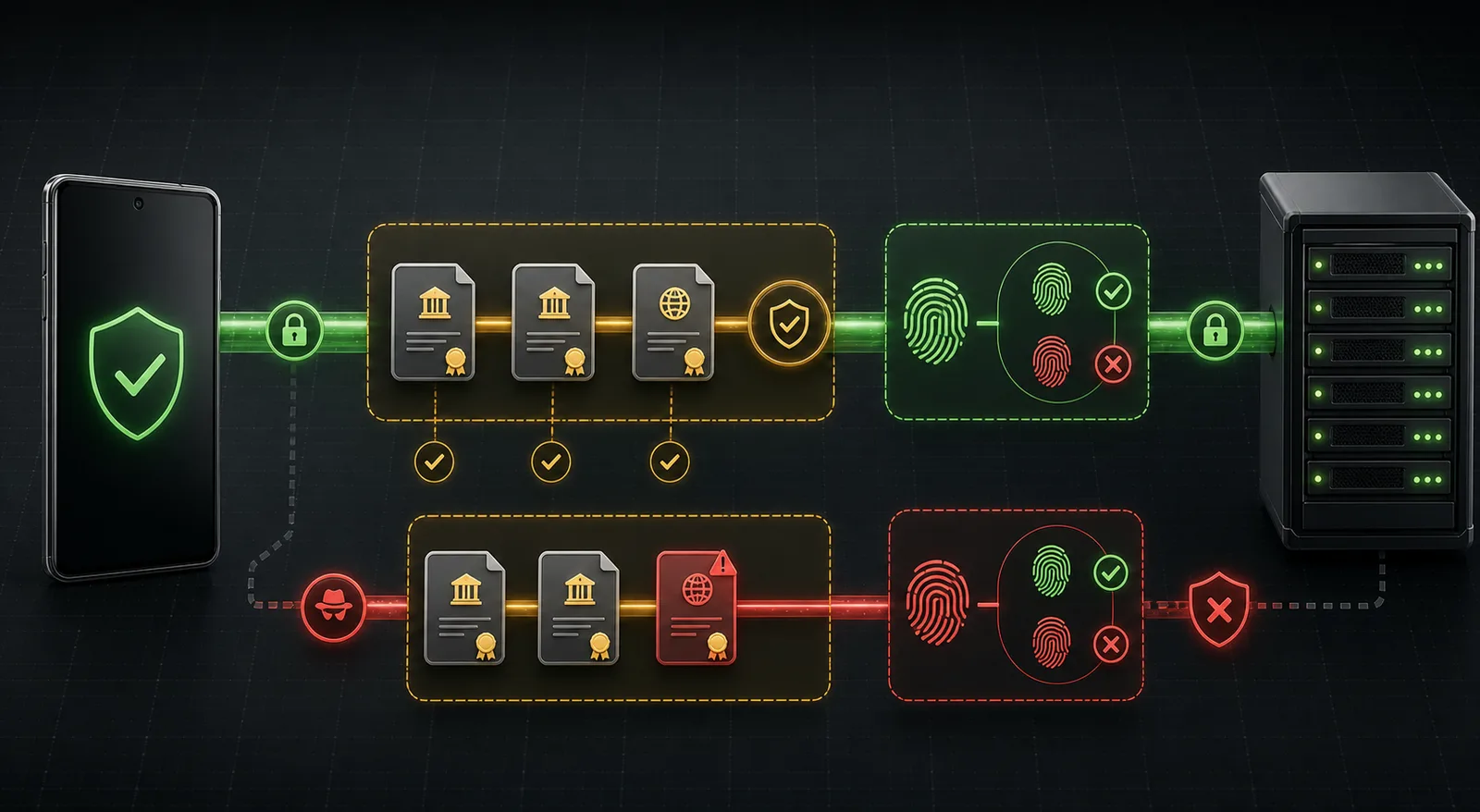
The upper path represents a server chain that passes both ordinary trust and the application's pin comparison. The lower path shows an analysis proxy certificate reaching the stricter pin gate and being rejected.
Android applications commonly implement this second gate in one of five places:
- A declarative
<pin-set>inside Network Security Configuration. - OkHttp's
CertificatePinnerclass. - A custom
X509TrustManagerorHostnameVerifier. - A framework-specific layer such as Flutter, Cronet, WebView, or a native library.
- A proprietary comparison implemented in obfuscated Java, Kotlin, or native code.
That variety explains why a copied “universal unpinning” script works on one application and fails silently on another. The correct hook depends on the code that actually owns the decision.
Lab Architecture and Required Components
Use a disposable emulator or test device. A rooted Android Virtual Device is convenient because Frida can attach through frida-server, snapshots make recovery fast, and the application data can be reset between experiments. A physical device works as well when its architecture, Android version, and Frida deployment method are documented.
The lab has four components:
| Component | Purpose | Evidence to record |
|---|---|---|
| Android test device | Runs the controlled APK | Android version, ABI, package name |
| Frida client and server | Instruments the process | Exact matching Frida versions |
| Interception proxy | Displays HTTP requests and responses | Listener address, CA fingerprint |
| Test API | Provides known endpoints and accounts | Hostname, expected request, test data |
This walkthrough uses the placeholder package com.mhfh.pinninglab and a workstation reachable at 192.0.2.2:8080. The 192.0.2.0/24 range is reserved for documentation; replace it with the address of your isolated lab workstation. Never assume the emulator's loopback address points to the host—inside Android, 127.0.0.1 normally means the Android guest itself.
Install the Frida command-line tools in a dedicated Python environment and confirm the client version:
python -m venv .venv-frida
# Linux or macOS
source .venv-frida/bin/activate
python -m pip install --upgrade frida-tools
frida --version
Download the matching frida-server build for the device ABI from the official Frida releases. Client and server version drift is a frequent source of attach errors, so record both instead of relying on a floating package version.
Determine the device ABI and deploy the binary:
adb shell getprop ro.product.cpu.abi
adb push frida-server /data/local/tmp/frida-server
adb shell "chmod 755 /data/local/tmp/frida-server"
adb shell "su -c /data/local/tmp/frida-server &"
frida-ps -Uai
The last command should enumerate installed applications. If it cannot see the device, solve transport and privilege issues before touching TLS. A pinning hook cannot compensate for a broken ADB connection, mismatched binary architecture, or a server that never started.
Establish the Baseline Before Hooking Anything
A credible test begins with a negative control. Configure the Android Wi-Fi proxy to the workstation listener, install the proxy CA using the method appropriate to the test image, launch the application, and trigger one known API action. Record three observations:
- Does the proxy receive a TCP or TLS connection?
- What exception appears in
adb logcat? - Does the same endpoint work when the proxy is disabled?
Use a narrow logcat filter while reproducing the request:
adb logcat -c
adb logcat | grep -Ei "ssl|tls|handshake|certificate|pin|okhttp|trust anchor"
Different failures point to different layers. Trust anchor for certification path not found often means the application does not trust the installed user CA. Certificate pinning failure with peer-certificate hashes is characteristic of OkHttp. A native crash or a failure with no Java exception can indicate a native or cross-platform networking stack. A clean handshake followed by an HTTP error means pinning may not be the problem at all.
Before introducing Frida, also confirm basic proxy routing with the Android browser or a small test app that deliberately trusts the proxy CA. This separates workstation firewall, proxy listener, and routing problems from the target application's trust policy.
Static Triage: Find the Pinning Implementation
Static inspection saves time because it gives the runtime experiment a target. Preserve the original APK hash, decode a working copy, and search for network-security declarations, library names, pins, and trust classes.
sha256sum pinning-lab.apk
apktool d pinning-lab.apk -o pinning-lab-decoded
jadx -d pinning-lab-jadx pinning-lab.apk

grep -RniE "networkSecurityConfig|pin-set|CertificatePinner|sha256/|TrustManager|HostnameVerifier"   pinning-lab-decoded pinning-lab-jadx
Check AndroidManifest.xml for android:networkSecurityConfig. If it references an XML resource, inspect that file for trust-anchors, debug-overrides, and pin-set. Android's official Network Security Configuration documentation describes how domain policies, custom trust anchors, backup pins, and pin expiration interact.
Then inspect dependencies. OkHttp packages typically retain recognizable class structures even when the application's own code is obfuscated. Search for okhttp3.CertificatePinner, call sites that build an OkHttpClient, and strings beginning with sha256/. If no Java-side path appears, inspect native libraries under lib/<abi>/ and identify whether the package embeds Flutter, Cronet, or another runtime.
Static evidence does not prove which path executes. It narrows the candidates for runtime observation.
Observe Classes and Overloads at Runtime
Launch the package through Frida so the instrumentation is available before early initialization code runs:
frida -U -f com.mhfh.pinninglabAt the Frida prompt, resume the process if the installed Frida version leaves it paused. For scripted work, use -l to load a local JavaScript file. Start with observation rather than modification:
Java.perform(function () {
  const target = "okhttp3.CertificatePinner";

  try {
    const CertificatePinner = Java.use(target);
    console.log("[+] Loaded " + target);

    CertificatePinner.check.overloads.forEach(function (overload, index) {
      const signature = overload.argumentTypes
        .map(function (type) { return type.className; })
        .join(", ");
      console.log("    [" + index + "] check(" + signature + ")");
    });
  } catch (error) {
    console.log("[-] " + target + " unavailable: " + error);
  }
});
Save this as enumerate-pinner.js, then spawn the lab package:
frida -U -f com.mhfh.pinninglab -l enumerate-pinner.jsThis step matters because OkHttp versions and Kotlin-generated methods can expose different overloads. Guessing a signature produces errors such as “argument types do not match any overload.” Enumeration turns that error into a concrete method list.
A Focused OkHttp CertificatePinner Hook
For a lab build using the common check(String, List) form, the pinning method returns void when validation succeeds and throws when it fails. A minimal hook can log the hostname and return without running the original comparison:
Java.perform(function () {
  const CertificatePinner = Java.use("okhttp3.CertificatePinner");
  const check = CertificatePinner.check.overload("java.lang.String", "java.util.List");

  check.implementation = function (hostname, peerCertificates) {
    console.log("[+] CertificatePinner.check intercepted");
    console.log("    host: " + hostname);
    console.log("    peer certificates: " + peerCertificates.size());
    return;
  };

  console.log("[+] OkHttp CertificatePinner hook installed");
});
Save the file as pinning-lab.js and run:
frida -U -f com.mhfh.pinninglab -l pinning-lab.jsTrigger the same API action used for the negative control. Successful validation requires evidence from three places:
- Frida prints the expected API hostname when the request occurs.
- The proxy receives and decrypts the request.
- The application receives the expected test response without the earlier pin exception.
Do not count a quiet console as success. The hook may have loaded while the application used another network stack. Conversely, seeing the hostname in Frida proves the method executed but does not prove the proxy received every request.

Frida attaches to the application process and changes a selected verification method in memory. The application binary on disk remains unchanged while the lab proxy gains visibility into the test connection.
Testing a Custom TrustManager Path
Some applications do not use OkHttp pinning. They provide a custom trust manager, call Conscrypt internals, or wrap the platform result. The diagnostic process stays the same: enumerate the loaded class, inspect its overloads, and hook only the method observed in the lab trace.
On many Android versions, com.android.org.conscrypt.TrustManagerImpl.verifyChain participates in chain validation. The exact signature varies, so enumerate it before installing a hook:
Java.perform(function () {
  try {
    const TrustManagerImpl = Java.use("com.android.org.conscrypt.TrustManagerImpl");
    TrustManagerImpl.verifyChain.overloads.forEach(function (overload, index) {
      console.log("verifyChain[" + index + "]: " + overload.argumentTypes
        .map(function (type) { return type.className; })
        .join(", "));
    });
  } catch (error) {
    console.log("TrustManagerImpl not available: " + error);
  }
});
If the application defines its own X509TrustManager, hooking the system class may be too broad and may still miss the custom comparison. Search the decompiled application for classes implementing javax.net.ssl.X509TrustManager, then trace their checkServerTrusted methods. Logging the supplied authentication type, chain length, and Java stack trace can reveal who called the verifier without disabling it immediately.
Java.perform(function () {
  const Exception = Java.use("java.lang.Exception");
  const Log = Java.use("android.util.Log");
  const LabTrustManager = Java.use("com.mhfh.pinninglab.network.LabTrustManager");
  const original = LabTrustManager.checkServerTrusted.overload(
    "[Ljava.security.cert.X509Certificate;",
    "java.lang.String"
  );

  original.implementation = function (chain, authType) {
    console.log("[+] LabTrustManager called: " + authType + ", chain=" + chain.length);
    console.log(Log.getStackTraceString(Exception.$new()));
    return original.call(this, chain, authType);
  };
});
This trace-only version preserves the original decision. Once it proves the lab class owns the failure, replace the implementation in the controlled test run and document that exact transition. Observation before bypass makes the final finding defensible.
Spawn Versus Attach: Timing Changes the Result
Frida can spawn a package with -f or attach to a running process with -n or its process identifier. Spawn mode is the default for pinning analysis because applications often construct HTTP clients during startup. If you attach after the singleton client and native libraries initialize, your hook may miss constructor behavior or the first request.
Attach mode remains useful when anti-instrumentation behavior occurs only during startup or when the test needs an already authenticated session. Compare the two explicitly:
# Instrument before application startup
frida -U -f com.mhfh.pinninglab -l pinning-lab.js

# Attach to an application already running
frida -U -n PinningLab -l pinning-lab.js
When a class is unavailable during Java.perform, it may live in a secondary DEX file or a custom class loader. Use Frida's class-loader enumeration to locate a loader capable of resolving the target, then set Java.classFactory.loader for the focused operation. Avoid blindly hooking every loaded class: it creates noise, destabilizes the application, and makes evidence difficult to interpret.
Why Common Frida Android SSL Pinning Bypasses Fail
The proxy CA is not trusted at the platform layer
Android applications targeting API level 24 and later do not automatically trust user-added certificate authorities. A debug build can use Network Security Configuration debug-overrides, while a rooted lab can place a CA in the system store. If normal chain validation fails before the pinning library runs, an OkHttp hook alone may not solve the connection.
The wrong overload is hooked
OkHttp and Kotlin compilation can expose check, check$okhttp, list-based, certificate-based, or generated variants. Print overloads from the installed application and select the signature actually invoked. Treat a script written for another version as a hypothesis, not an API contract.
The application uses native networking
Flutter applications may perform verification in native libraries. Cronet can bypass Java's usual HttpsURLConnection path. Games and hardened clients may call BoringSSL directly. If logcat shows no Java exception and Java hooks never fire, enumerate native modules and inspect the framework before adding more Java hooks.
The application uses multiple processes
An Android service can make network requests in a process separate from the visible activity. Use frida-ps -Uai, adb shell ps -A, and the manifest's android:process attributes to identify where networking occurs. Attach to the process that loads the client library.
The hook works, but only some traffic appears
Applications frequently mix stacks: OkHttp for REST, WebView for authentication, native code for media, and sockets for telemetry. Record which endpoints appear and which remain opaque. Partial visibility is a technical result, not a reason to claim a universal bypass succeeded.
QUIC or HTTP/3 avoids the expected proxy path
A client using UDP-based QUIC may not traverse a conventional HTTP proxy in the expected way. In a controlled build, disable HTTP/3 or force the documented test transport so the assessment measures the intended TLS path. Record transport changes because they can affect application behavior.
Evidence Collection and Interpretation
The finished test should be reproducible by another analyst. Preserve the following artifacts:
- SHA-256 hash of the APK.
- Android build, API level, ABI, and device image.
- Frida client and server versions.
- Full hook script with its hash.
- Proxy CA fingerprint and listener configuration.
- Negative-control log showing the original failure.
- Frida log showing the target method and hostname.
- Sanitized proxy request and response demonstrating visibility.
- Notes identifying endpoints or processes the hook did not cover.
The finding should distinguish transport visibility from vulnerability impact. Pinning can raise the cost of interception on a compromised or user-controlled device, but it does not repair weak authorization, exposed secrets, excessive API responses, or unsafe local storage. Once the controlled hook provides visibility, test those controls independently and report each issue on its own evidence.
Engineering a Pinning Design That Survives Operations
Android's documentation recommends backup keys when applications use Network Security Configuration pinning. Without a backup, routine certificate rotation or emergency key replacement can disconnect every deployed client. Pinning therefore creates an operational dependency between application releases, certificate lifecycle, and API infrastructure.
A maintainable design should define:
- What is pinned: leaf certificate, intermediate, or public key.
- At least one tested backup pin under separate key control.
- Rotation and expiry procedures exercised before production use.
- Debug-only trust behavior that cannot leak into release builds.
- Monitoring that distinguishes pin failures from network outages.
- Server-side authorization that remains correct when pinning is absent.
The OWASP Mobile Application Security Testing Guide documents both static and dynamic approaches to testing Android certificate pinning. Its central practical lesson matches this lab: identify the reused framework when possible, locate the relevant method, and adapt the instrumentation when generic tooling does not cover a custom implementation.
Compact Testing Checklist
Before closing the lab, confirm each item:
- The APK and hook script have recorded hashes.
- Client and server Frida versions match.
- Proxy routing works with a non-pinned control app.
- The original failure is preserved in logcat or proxy evidence.
- Static inspection identifies likely pinning code or framework.
- Runtime enumeration confirms the actual overload.
- The hook logs the intended lab hostname.
- The proxy captures a known request and response.
- Test data is sanitized before screenshots or publication.
- Uncovered transports and processes are documented.
- The emulator snapshot is reverted after testing.
Frequently Asked Questions
How does Frida bypass Android SSL pinning?
Frida injects instrumentation into the Android process and replaces a selected certificate-verification method while the app runs. For OkHttp, that may mean intercepting CertificatePinner.check; for a custom application, it may mean tracing and then replacing its X509TrustManager. The correct method depends on the networking stack found in the tested APK.
Why does installing a proxy CA not bypass certificate pinning?
Installing the CA addresses ordinary trust validation. Pinning performs an additional application-level comparison against an expected certificate or public-key fingerprint. Because the proxy generates a certificate with a different key, the chain can be trusted by Android and still be rejected by the app.
Should I use a universal Frida unpinning script?
A broad script can be useful for initial coverage, but it should not replace diagnosis. Review what it hooks, confirm which branch fires, pin the script version, and retain its source with the engagement evidence. For custom, obfuscated, native, or cross-platform implementations, a focused hook is usually more stable and explainable.
Can Frida inspect Flutter or native TLS traffic?
Yes, but ordinary Java hooks may not reach it. Flutter, Cronet, and native BoringSSL integrations can require framework-specific or native instrumentation. First determine which modules and functions handle the connection, then build a hook for that tested version instead of repeatedly adding unrelated Java trust-manager hooks.
Conclusion: Make the Bypass Explainable
A reliable Frida Android SSL pinning bypass is not defined by a green proxy history. It is defined by a chain of evidence: the proxy works, the unmodified app rejects its certificate, static analysis identifies a candidate control, runtime tracing proves which method executes, and a focused hook changes that result for the controlled application.
That methodical approach survives library updates and custom implementations better than a copied script. It also produces a stronger assessment record because every command answers a specific question. Continue with the Frida security tool profile, compare the initial package findings with the MobSF analysis workflow, or review our mobile application penetration testing service.